
This site is supported by our readers. We may earn a commission, at no cost to you, if you purchase through links.
Your backyard feeder just hosted a rare indigo bunting for exactly forty-seven seconds—but you missed it because your camera was too busy recording squirrels, swaying branches, and the neighbor’s cat. Standard motion sensors treat everything that moves as equally important, flooding your storage with thousands of useless clips while the moments you actually care about slip past unnoticed.
Modern bird camera motion detection technology solves this frustration through a refined pairing of infrared heat sensing and AI-powered recognition that distinguishes a cardinal’s approach from wind-blown leaves. The sensors monitor thermal signatures within milliseconds, while smart algorithms analyze beak shapes and flight patterns to separate genuine avian visitors from false triggers.
Understanding how these systems calibrate sensitivity, filter environmental noise, and target specific detection zones transforms a basic camera into a reliable wildlife documentation tool that captures the species you want without drowning you in irrelevant footage.
Table Of Contents
Key Takeaways
- Bird cameras combine infrared heat sensing with AI-powered recognition to distinguish actual avian visitors from false triggers like wind-blown branches, swaying leaves, and passing shadows—cutting irrelevant alerts by over 80 percent.
- Passive Infrared (PIR) sensors detect thermal signatures as small as 4–6°F differentials within milliseconds, while AI algorithms analyze beak shapes, plumage patterns, and flight behaviors to identify species with up to 96 percent accuracy.
- Optimal camera placement involves mounting 4–6 feet high at a 6-foot distance from feeders, angled slightly downward and away from direct sun, then fine-tuning sensitivity settings between 40–60 to capture medium-sized birds without drowning in insect alerts.
- Modern systems offer hybrid storage options—local microSD cards provide offline access and eliminate subscription costs, while cloud uploads enable remote viewing from anywhere but require ongoing monthly fees and reliable internet connectivity.
What is Bird Camera Motion Detection?
Motion detection in bird cameras works like a dedicated watchman—constantly scanning for activity and springing to life the moment a feathered visitor arrives. Unlike the motion sensors in your home security system, these specialized systems distinguish between genuine bird movement and false triggers like swaying branches or passing shadows.
When shopping for a bird camera, understanding what to look for in bird cameras ensures you get motion detection that’s both sensitive enough to catch quick movements and smart enough to ignore false alarms.
Understanding how this technology operates will help you choose the right camera and position it for reliable, frustration-free birdwatching.
If you’re just getting started, our bird cameras for beginners guide walks you through the essentials without the overwhelm.
Definition and Core Functionality
Motion detection transforms your bird camera from a passive recorder into a smart observer that springs to life the instant feathered visitors arrive. Here’s how the core functionality works:
When birds land at your feeder, bird cameras for remote viewing can send instant alerts to your phone so you catch every visit in real time.
- Sensor technology constantly monitors a defined detection zone, watching for heat signatures and movement that signal a bird’s approach.
- Trigger mechanisms activate recording within milliseconds when motion crosses sensitivity thresholds, capturing brief visits you’d otherwise miss.
- Motion-triggered clips save power and storage by recording only active moments instead of hours of empty footage.
Understanding the importance of can help you customize how your camera reacts to subtle movements.
Differences From Standard Motion Sensors
Standard security PIR sensors aren’t built for birds—they’re tuned to human-sized movement and often ignore tiny, quick motions like a finch’s flutter.
Your bird camera uses sensor calibration and motion tuning designed specifically for subjects only 10–15 cm long, with detection accuracy focused on narrow zones around feeders.
AI-powered species recognition and pixel difference analysis separate genuine bird visits from false triggers caused by swaying branches or passing shadows.
For more details on the comparison of camera capabilities, you can explore which type of device best fits your birdwatching needs.
Importance for Birdwatching and Wildlife Study
This technology transforms casual bird watching into rigorous wildlife observation. Motion detection lets you document species diversity and bird behavior without disturbing ecological balance—cameras placed at remote colonies help conservation teams track breeding success for habitat research.
Motion detection transforms casual birdwatching into rigorous wildlife observation, letting you document species and behavior without disturbing natural habitats
Your automated recordings support citizen science platforms that monitor wildlife populations across cities, turning backyard clips into real data for bird conservation and biodiversity studies.
These platforms often rely on detailed bird identification by sound to accurately classify species from thousands of submitted recordings.
How Motion Detection Sensors Work
At the heart of every bird camera sits a sensor that acts like an invisible tripwire—detecting movement before your eye ever could. These sensors don’t just react to anything that moves; they’re tuned to pick up the specific heat signatures that warm-blooded visitors create.
Understanding how this technology works helps you get the most out of your setup and avoid those annoying false alerts.
For nest monitoring in exposed locations, choosing a camera built to withstand weather ensures reliable operation without constant motion-triggered interruptions.
Passive Infrared (PIR) Sensor Technology

Your bird camera’s watchful eye relies on Passive Infrared (PIR) sensors—tiny pyroelectric crystals housed in a metal can that generate electrical pulses when heat patterns shift across their surface.
Motion detection technology springs to life through three core components:
- Infrared lens: A Fresnel design segments detection zones, filtering distant noise while capturing close movement
- PIR materials: Temperature-compensated ceramics maintain sensor calibration across environmental swings
- Thermal imaging elements: Dual matched sensors compare heat signatures, triggering alerts only when differential changes occur
Heat and Movement Detection Principles
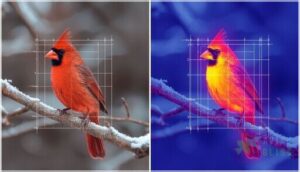
Your camera’s PIR sensors distinguish cardinals from rustling leaves by tracking heat signatures—warm-blooded visitors emit infrared radiation that contrasts sharply against cooler backgrounds. When thermal imaging detects a 4–6°F differential moving through adjacent zones, motion-triggered recording begins.
Pixel difference analysis compares successive frames, while sensor calibration adjusts baselines during temperature swings—ensuring motion detection technology captures genuine feathered activity, not false alerts from wind-blown branches or shifting sunlight.
Detection Range and Sensitivity Settings
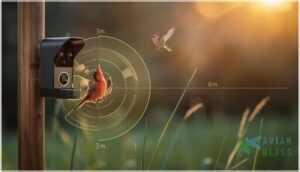
Most PIR sensors deliver reliable triggers within 3–6 meters for finch-sized birds, though specs often claim 5–10. You’ll adjust Motion Sensitivity through Low, Medium, or High Trigger Settings—high captures quick sparrows, low cuts False Alerts from swaying grass. Detection Zones let you block busy paths, while Camera Calibration refines pixel difference analysis during temperature shifts, keeping motion-triggered events focused on genuine feathered visitors.
- High sensitivity extends range but risks extra triggers from insects or distant foliage
- Medium settings balance detection for jays and blackbirds without constant notifications
- Low thresholds suit larger wildlife, reducing clips from tiny movements near feeders
AI and Smart Recognition in Bird Cameras
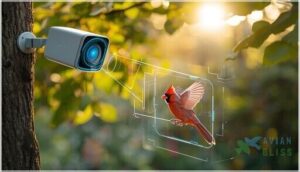
Motion sensors catch movement—but AI separates the sparrows from the swaying branches. Modern bird cameras use machine learning to recognize species, filter out false alarms, and even work alongside infrared technology for round-the-clock identification.
Here’s how smart recognition transforms raw motion into actionable insights.
Reducing False Triggers With AI Filtering
Modern Smart Alert Systems use Artificial Intelligence and Machine Learning to cut false alarms dramatically. AI Object Filtering compares motion-triggered events against learned patterns, such as birds, dropping insects, swaying branches, and passing cars, before you get pinged.
You can draw Motion Zone Control boundaries around your feeder and adjust Sensitivity Adjustment sliders. Raising AI confidence thresholds delivers fewer, more accurate notifications. False Trigger Reduction often exceeds 80 percent in busy yards.
Identifying Bird Species via AI Algorithms
Once motion triggers recording, AI Bird Recognition takes over—Convolutional Models scan each frame for beak shape, plumage, and silhouette. Image Analysis compares your visitor against databases of 500-plus Species Classification profiles, often hitting 96 percent accuracy in good light.
Audio Identification adds vocalizations to the mix, so Machine Learning algorithms cross-check songs with visuals. Most Image Recognition systems suggest the correct bird within their top-five predictions, even when details blur.
Integration With Night Vision and Infrared Sensors
When darkness falls, infrared night vision transforms your camera into a 24-hour sentinel. After a PIR motion detection trigger fires, infrared sensors light up birds out to 25 meters using invisible 850nm or 940nm wavelengths—the former brighter, the latter truly no-glow.
Smart detection algorithms then analyze motion-triggered infrared frames in real time, filtering wind-blown leaves from genuine visitors and cutting false alerts by over 80 percent in low light imaging scenarios.
Key Features of Modern Bird Camera Systems
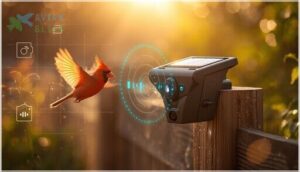
Motion detection technology is just the beginning—modern bird cameras pack a full suite of features that determine how well they’ll serve your backyard observation needs. The right combination of connectivity, durability, power options, and storage can make the difference between a camera that frustrates you and one that seamlessly captures every feathered visitor.
Let’s break down the key features you’ll encounter when choosing a bird camera system.
Live Streaming and Notification Alerts
You’ll find that live streaming and notification systems bring your bird feeder straight to your phone. Most bird cameras deliver 1080p or 2K live video through mobile apps, which send real-time notifications within seconds of motion detection.
Alert systems let you adjust sensitivity, set schedules, and apply AI filters so you only receive bird events—cutting down on false triggers from wind or passing cars.
Weatherproof and Outdoor-Ready Design
Outdoor cameras need protection that matches nature’s extremes. You’ll want IP65 or IP66 ratings—both create dust-tight seals and withstand rain from any angle, though IP66 manages stronger water jets during storms.
Polycarbonate housings with UV-resistant coatings prevent cracking in freezing weather and warping under summer sun. Most operate from minus 20°C to 50°C, while sealed connectors and stainless hardware guard against corrosion year-round.
Battery, Solar, and Wired Power Options
You’ll choose from three main power sources—battery packs, solar panels, or hardwired connections—each matched to your monitoring needs. Lithium iron phosphate cells deliver 5 to 15 year lifespans and reliable energy storage for motion detection cycles, while solar charging systems extend runtime indefinitely in sunny locations.
Wired setups guarantee continuous WiFi connectivity and eliminate recharging, ideal when weatherproof design meets permanent installation requirements.
Local Vs. Cloud Storage of Recordings
Once you’ve chosen your power setup, you’ll decide where motion-triggered clips actually live. Local storage writes recordings straight to a microSD card inside the camera—no WiFi connectivity required—so you keep offline viewing access even when the internet fails. Cloud storage uploads event snippets to remote servers, letting you check camera settings and review footage from anywhere but adding storage costs and relying on cloud reliability and data security measures you don’t directly control.
- MicroSD cards offer one-time expense and complete local accessibility.
- Cloud plans usually cost around $7 monthly for extended retention.
- Hybrid systems combine on-device archives with cloud highlights.
- Local recordings survive outages; cloud copies survive theft.
- Rolling retention automatically deletes older cloud clips after 3–30 days.
Optimizing Bird Camera Placement and Performance
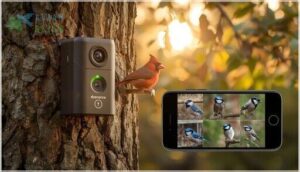
Getting your bird camera set up correctly makes the difference between a memory card full of empty branches and genuine wildlife moments you’ll want to share.
The right placement strategy, paired with smart sensitivity adjustments, ensures you capture actual bird activity without drowning in false alerts from wind-blown leaves or passing shadows.
Here’s how to position your camera for reliable performance and keep it running smoothly over the long haul.
Strategic Positioning for Accurate Detection
Position your camera 4 to 6 feet high with the lens angled slightly downward—this mounting height keeps motion-triggered alerts focused on feeding birds, not passing pets. Aim for a 6-foot distance to fill two-thirds of your field of view with feeder activity while allowing clear approach shots.
Point away from direct sun and busy roads; background noise reduction starts with simple camera angle optimization that frames foliage, not driveways, giving wildlife monitoring systems clean heat signatures to lock onto.
Adjusting Sensitivity to Minimize False Alerts
Start at maximum sensitivity, then dial it down incrementally over a few days until motion alerts settle into a rhythm that catches birds without drowning you in false triggers from insects or shadows. Fine-tuning this motion threshold transforms raw pixel difference analysis into smart alert filtering:
- Set sensitivity between 40–60 for medium birds while ignoring small insects.
- Draw custom detection zones around feeders, excluding busy roads and sidewalks.
- Schedule alerts for dawn and dusk when target species are most active.
- Enable AI object filtering to distinguish birds from foliage and passing cars.
Calibration cuts notifications by up to 90 percent.
Routine Maintenance for Reliable Operation
Weekly lens cleaning and sensor care prevent missed motion-triggered events—dust and water spots soften detection accuracy within days. Inspect housing seals monthly for cracks that compromise weatherproofing, then verify power management by checking battery contacts and solar panels.
Update firmware twice yearly to improve motion detection algorithms, and format your SD card after backing up surveillance and monitoring clips. These simple camera settings checks guarantee your motion alerts stay sharp season after season.
Frequently Asked Questions (FAQs)
How does a motion detection camera work?
A motion detection camera monitors its field of view continuously, using sensor technology and detection algorithms to spot changes. It then triggers recording when movement crosses the lens, sending motion alerts instantly.
Can multiple bird cameras share one network?
Yes, your router can handle several bird cameras on one WiFi network—most support 50 to 250 devices.
Watch network bandwidth and signal strength, though, since multiple smart bird feeders streaming simultaneously can strain wireless connectivity.
How do weather conditions affect motion accuracy?
Mother Nature plays no favorites—rain interference, snow impact, fog effects, wind influence, and temperature variance all disrupt motion-triggered outdoor surveillance.
Weatherproof housing protects hardware, but infrared night vision and motion detection accuracy still suffer during storms.
What triggers work best for small birds?
Small birds need PIR sensitivity tuned below 1°C, AI filtering for species recognition, and tight motion zones around feeding ports.
Dual trigger logic combining heat detection with video analysis cuts false motion alerts while reliably capturing tiny visitors.
Do bird cameras record sound or video only?
The devil’s in the details—most bird cameras capture both video recording and sound via built-in microphones, though live streams often show video only.
Audio settings in your camera settings and configuration let you toggle sound capture for richer wildlife documentation.
Which camera resolution is ideal for identification?
For clear identification, you’ll want at least 1080p video resolution—that’s 1920 x 1080 pixels.
Image quality matters more when birds sit farther from your camera lens, making pixel density and sensor size essential for capturing fine plumage details.
Conclusion
A backyard birder in Oregon documented seventeen species in three months after upgrading from basic motion sensors to AI-equipped detection. She finally captured a gray jay’s first feeder visit without scrolling through 4,000 squirrel videos.
Understanding bird camera motion detection technology turns every backyard into a curated wildlife archive. Thermal precision and intelligent filtering guarantee you’ll never miss another indigo bunting because your camera was too busy recording falling leaves.
- https://gardepro.com/blogs/gardepro-blogs/how-to-redduce-false-triggers-on-trail-cameras
- https://www.bilantan.com/blogs/blog/best-squirrel-proof-smart-bird-feeder-2025-top-picks-reviews-amp-buying-guide
- https://support.vicoo.tech/hc/en-us/articles/13062099399065-How-to-set-the-motion-detection-duration
- https://shallowsky.com/blog/hardware/pir-wildlife-detecting.html
- https://www.electrophysics.in/how-does-motion-detection-bird-camera-work.html